Forum archives » General Discussion » Some Characters...

ComicCreator
May 13, 2007 7:57 AM

Hey Guys, I made some Heads of Characters I wanted to create. Im not as funny as you guys, probobly being much younger. Anyway, I decided to make some characters and I need some help. Firstly, Take a look...

http://img516.imageshack.us/img516/6456/faceunenu1.png

http://img295.imageshack.us/img295/1923/facetwazi8.png

http://img516.imageshack.us/img516/906/facetrionr0.png

http://img516.imageshack.us/img516/266/facequatrovc3.png

 I've made the heads, and If you have any comments, please dont be afriad to post them, good or bad. One problem Im having is making bodies, do you recommend using free hand paint brush or Spray can...or using straight lines and shapes?

 Thanks In Advance...

 Comic Creator


Post #246557link

xxausrottenxx
May 13, 2007 9:05 AM

uhhhh..

Post #246559link

biped
May 13, 2007 10:18 AM

Your character heads are jolly.  This thread may be of assistance to you.

Post #246562link

Injokester
May 13, 2007 8:32 PM

The style on these is solid, but you'll need to practice your skills in paint. Always use the bendy line tool if you can (set to the thickest setting), and touch it up using the pencil and paintbrush tools.

Also always save in PNG format, and do everything at 300-400% of the finished size.

As for the bodies- use the tools I mentioned above, and check out the guide biped linked to on how to trace other bodies- you're welcome to use any that I've drawn as a basis for this. Once you get the hang of it you'll be able to work from scratch.

Post #246573link

Injokester
May 13, 2007 9:09 PM

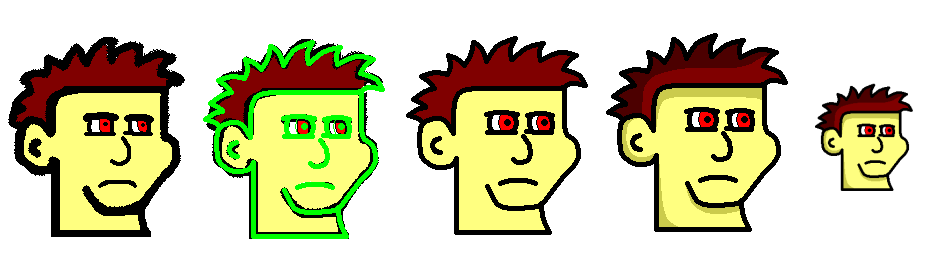
I took the liberty of retracing your lines to give you an idea of what you need to do, this is roughly how it should turn out when you're done:


Post #246576link

BigFrank105
May 13, 2007 11:07 PM

Injokester, you're amazing.

Post #246585link

mandingo
May 14, 2007 1:06 AM

Post #246590link

gabe_billings
May 14, 2007 7:08 AM

Mandingo, you're amazinger.

Post #246599link

biped
May 14, 2007 9:22 AM

Lou Ferrigno, you're the amazingest.

Post #246604link

ComicCreator
May 14, 2007 9:45 AM

Thanks alot Injokester!


Post #246605link

ComicCreator
May 14, 2007 10:17 AM

Injokester, how did you shade it, what did you use?

Post #246608link

mandingo
May 14, 2007 12:18 PM

quote:

ComicCreator wrote:

Injokester, how did you shade it, what did you use?


green

Post #246614link

BigFrank105
May 14, 2007 10:08 PM

Slightly darker colors than what you use will give you the shading effect you so desire. And green.

Post #246660link

xxausrottenxx
May 15, 2007 4:43 AM

magic also helps.


oh yeah, and green

Post #246665link

Injokester
May 15, 2007 9:51 PM

quote:

ComicCreator wrote:

Injokester, how did you shade it, what did you use?


You just make the areas along the left and top darker. To do this I hand draw an area where the shading will go on the otherwise finished image, in a colour that isn't used anywhere else (such as bright green).

Then I remove everything but the green areas, fill everything else with another colour that hasn't already been used (say bright red), and use this as a template.

Next I darken the original image (in this case I used the built in Microsoft Photo Editor, you can also use photoshop or even darken by hand) and saved it under a different name.

Then you take the template, paste it over the darkened version of the image and remove the bright red areas with the unfill tool.

Finally you take what's left and paste it back over the top of the original.

TIP: removing crap- if you draw an outline over an image and want to remove everything but the outline this is what you do:

1) Make sure the outline is all one colour (and that it's a colour that's not used anywhere else in the image, and not black).

2) Use ctrl-a then ctrl-c to copy the whole image, paste it into a NEW paint window (make sure the canvas is smaller than the image- ctrl-e, 1, tab, 1, enter will take care of that).

3) Fill the new canvas with black, and paste the image back on (with 'draw opaque' turned off (image dropdown in paint).

4) Unfill the outline you drew earlier so it's white, then ctrl-e to open the attributes menu, highlight the puddle next to black and white and press enter (and confirm the message that pops up). Now you'll have a black image with a white outline. Use ctrl-i to invert the colours, Use ctrl-a then ctrl-c and copy the outline to a NEW paint window. (When you go to black and white it won't let you go back unless you paste to a new window).
Post #246711link

LuckyGuess
May 15, 2007 11:06 PM

also green

Post #246716link

Rabid_Weasle
May 16, 2007 7:49 AM

Also, cocks.

Post #246725link

mandingo
May 16, 2007 2:31 PM

"cock green" should be a crayola color

Post #246767link

boloboffin
May 16, 2007 4:25 PM

Also "vee-jay-jay pink"

Post #246776link

Forum archives » General Discussion » Some Characters...

stripcreator
Make a comic
Forums
featuring
diesel sweeties
jerkcity
exploding dog
goats
ko fight club
penny arcade
chopping block
also
Brad Sucks